Odoo Implementation and Support for Small Business
Swap the spreadsheets and disconnected apps for one Odoo system covering accounting, stock, sales and operations. Our Odoo consultants set it up around how your business already works, and stay on to support it after launch.

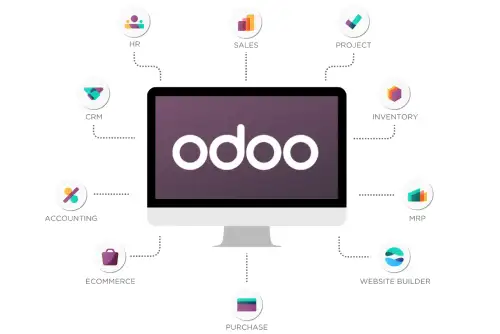
One system instead of a dozen separate tools
Most small businesses reach a point where spreadsheets, a separate invoicing app, a stock sheet and a CRM nobody updates stop being enough. Bringing in a big ERP consultancy for a business your size can feel like overkill, and it often is.
Our Odoo consultants set up only the modules you need, whether that's accounting, inventory, sales, purchasing, HR or manufacturing, configured around your existing processes rather than a generic template.
And we don't disappear at go-live. We keep supporting, adjusting and extending your system afterwards.
Odoo modules we implement
Start with one module or roll out a connected set across the business.
Accounting
Invoicing, bank sync & financial reporting
Inventory & Warehouse
Stock levels, transfers & reordering
Sales & CRM
Pipelines, quotes & customer records
Purchase & Vendors
Purchase orders & vendor management
HR & Payroll
Employee records, leave & attendance
Manufacturing
Bills of materials & production orders
Point of Sale
In-store & counter sales, synced live
Reporting & Dashboards
Real-time visibility across modules
Odoo Services We Offer
From a first set-up to keeping an existing system running smoothly.

New Implementation & Setup
Typically covers
A working Odoo system set up for what your business needs now, not a bloated generic install.

Module Configuration & Customization
Typically covers
Odoo fits the way your team already works, instead of forcing a new process on them.

Data Migration
Migrating from
Your historical records arrive in Odoo clean and reconciled, with nothing lost.

Third-Party Integrations
Works with
Orders, payments and shipping data reach Odoo automatically, with no retyping.

Ongoing Odoo Administration & Support
Typically covers
Your system stays up to date and running without an in-house administrator.

Odoo Training for Your Team
Typically covers
Your team uses Odoo confidently every day without relying on the person who set it up.
Why implement Odoo with GetFriday
One connected system, without an IT team to run it.
One Connected System
Accounting, stock, sales and more in one platform instead of scattered tools.
No Full-Time ERP Hire
Odoo implementation and admin skills without hiring an in-house specialist.
Scoped to Your Size
Start with the modules you need now and add more as the business grows.
Real-Time Visibility
Stock, sales and financial figures update together, instead of being reconciled at month-end.
Secure Implementation
Your business and customer data handled under ISO 27001.



Why choose GetFriday for Odoo implementation?
GetFriday has provided virtual assistant and business support since 2005, and our Odoo work follows the same idea: you get the expertise without a full-time hire or a large consultancy contract.
We scope each project around what small businesses really use, avoid customisation you don't need, and stay on for administration after launch, so your Odoo system doesn't become a one-off project nobody looks after.
Data is handled under ISO 27001, plans are flexible, and you can start with one module and add more later.
A Customised Odoo Platform for Customers, Projects, Billing and Sales, with WhatsApp and a Mobile App
How GetFriday set up Odoo with role-based dashboards, WhatsApp communication, a mobile app and custom modules, so a whole team could work from one system.
1. The Client Challenge
This client managed customers, projects, tasks and billing across separate tools and spreadsheets. Sales kept their own lists, project updates travelled through chat, and the accounts team rebuilt the picture at invoicing time. Nobody could say quickly where a customer stood or who was working on what.
Communication was a second problem. Most customers preferred WhatsApp, so conversations sat on individual phones and were lost when people changed roles. Managers, salespeople, project staff and accountants also needed very different views of the same data, and the team often worked away from a desk. They wanted one system that fitted how they actually worked, even where standard Odoo did not go far enough.
2. Our Approach
Step 1: Understanding Roles and Workflows
We began by listing who uses the system and what each person needs to see and do: sales, project managers, team members, accountants and management. We mapped how a customer moves from first contact through delivery to payment, and where the current process breaks.
Step 2: Customer and Sales Management
Customers and leads were set up in Odoo with clear stages, owners and follow-up activities. Quotations convert into sales orders, so sales information carries forward instead of being typed again.
Step 3: Project and Task Management
Confirmed work becomes a project with tasks, assignees and deadlines. Team members update their own tasks, and managers see progress without chasing for status.
Step 4: Internal Task Management
Not all work comes from a customer. We set up internal tasks for admin, approvals and follow-ups, which are kept separate from customer projects but visible in the same place.
Step 5: Accounting and Billing
Invoices are raised from sales orders and project work, payments are matched against them, and outstanding amounts are visible to finance at any point.
Step 6: Customising Existing Modules and Creating New Ones
Where standard Odoo did not match the workflow, we customised the existing modules, such as forms, approval steps, fields and reports. Where nothing existed, we built new modules specific to the client's process.
Step 7: Role-based Dashboards
Each role gets a dashboard built for its own work. Sales see pipeline and follow-ups, project staff see their tasks, finance sees invoices and payments, and management sees the overall picture. Nobody has to dig through screens that do not apply to them.
Step 8: WhatsApp Integration
WhatsApp was connected to Odoo, so customer messages were linked to the customer or lead record. The whole team can see the conversation history, and it stays with the account when staff change.
Step 9: Mobile App by Role
A mobile app gives each role access to what it needs on the move, such as updating tasks, checking customers, following up on leads or reviewing dashboards, with access controlled by the same roles used in Odoo.
3. Everyday Cases
Case 1: A New Enquiry Reaches Sales
A lead is created, assigned and followed up. The salesperson messages the customer on WhatsApp from Odoo, and the conversation is saved on the lead.
Case 2: Winning a Deal and Starting the Project
The quotation is accepted and becomes a sales order. A project is created with tasks and owners, and the delivery team sees it on their dashboard immediately.
Case 3: Team Members Working in the Field
A team member opens the mobile app, sees their tasks for the day and updates progress on site. The project manager sees the change without a phone call.
Case 4: Billing and Collections
Accounts raises the invoice from the order, records the payment when it arrives and follows up on anything overdue from the finance dashboard.
Case 5: Managing Internal Work
An internal request, such as an approval or an admin task, is assigned and tracked in the same system, so it does not get lost in email.
Case 6: Management Review
Managers open a dashboard showing sales, project status and billing. They can drill into a single customer or project when something needs attention.
Case 7: A Process Odoo Does Not Cover
When the client needed a workflow that standard Odoo did not support, we built a custom module for it and tied it into customers, projects and billing, so it behaves like part of the system.
Case 8: Changing Roles and Access
When someone joins or moves teams, their role decides what they see in Odoo, on the dashboards and in the mobile app. Access is managed in one place.
4. What We Delivered
- Customer and sales management in Odoo, with stages, owners and follow-ups.
- Project management and task management for customer work.
- Internal task management for work that is not tied to a customer.
- Accounting and billing linked to sales orders and projects.
- Dashboards for sales, projects, finance and management, based on role.
- WhatsApp integration with conversations stored against customer and lead records.
- A mobile app with access based on Odoo roles.
- Customisation of the existing modules to fit the client's workflow.
- New custom modules for processes standard Odoo does not cover.
- Guidance for the team on using each module and their own dashboard.
5. The Results
The client now has one system for customers, projects, tasks, billing and sales, instead of information spread across tools and phones. Each person sees what they need for their role, whether at a desk or on the mobile app, and customer conversations stay on the record.
We track the benefit through how quickly leads are followed up, how task and project updates are kept current, how fast invoices are raised and collected, and how much manual re-entry and status chasing has been removed.
Outgrowing your spreadsheets?
Tell us what you're using now and we'll come back with an estimate.
Get A Free QuoteGetting started takes about a day
Tell us roughly what you need. We'll handle the rest of the set-up.
Tell us what you need
Which modules you want, and which systems, if any, you're moving away from.
We Configure & Migrate
Our consultants set up your modules, move your existing data across and connect the systems you rely on.
Go live, with support afterwards
Your team is trained, and a dedicated person stays on for admin and support after launch.
It depends on the project. What pushes the price up or down is which modules you need, how many users there are, your business processes, data migration, customization, integrations, training and ongoing support. Odoo’s own licensing or subscription fees are usually billed separately from implementation. Get in touch and we’ll confirm whether we offer the Odoo services you need, then quote based on your scope.
Odoo implementation means setting Odoo up so it matches how your business really works. That can cover gathering requirements, configuring modules, migrating data, building integrations, testing and training your team. Before you plan anything, talk to our team and confirm which of those we can deliver.
Odoo has modules for CRM, sales, accounting, inventory, purchasing, projects and a lot more. Which ones we can set up depends on our current technical capabilities and what your project calls for. Before you settle on an approach, confirm our experience with the specific modules you want, and check licensing, integrations and deliverables too.
Odoo bends to different ways of working through configuration, and through custom development when configuration isn’t enough. Whether we can deliver a particular customization depends on the technical requirements and who’s available with the right expertise. Before we start, write down the workflow you want, the systems you already use, the user roles, your reporting needs and how you’ll decide the work is done. That lets us scope it properly.
Migration is moving your data out of your current systems and into Odoo without losing quality or consistency on the way. Depending on what’s available, we can help organize your source data, map fields, prepare import files and check the records once they’re in. Plan for backups, access permissions, duplicate records and testing before your team starts using the new system for real.
It depends on how many modules you need, how complex your processes are, what shape your data is in, how much customization and integration is involved, and how available your people are. A small setup and a rollout across several departments are very different jobs. We’ll review your scope, dependencies and testing needs, then give you a realistic timeline.
Often, yes. Odoo can connect to supported websites, payment providers and other business systems through existing connectors, APIs or custom work. Whether it works in your case depends on the platforms, what’s available in your region, the technical requirements and access permissions. Once we’ve looked at your systems and how you want data to flow, we’ll confirm whether we can deliver the integration.
15,000+ clients in 80+ countries
I've been using Get Friday for a few years now for both personal and business need. I can say that the VAs are superb. When you delegate something you don't want that to create more work or stress. Tasks are always proactively acknowledged, verified and estimated for how long they might take and then completed in a timely manner so I always know where I'm up to. They work in the clients time zone and available to Skype if needed. They are flexible in using systems and processes that the client uses so they just slot straight in to business and life and help you get a whole load more done!

Saz Bailey
Google Review
GetFriday has been instrumental in my work and business. They paired me up with a professional, responsive assistant to take care of daily, online tasks. They will work early and late to ensure deadlines are met and keep in constant communication with you throughout. GetFriday has helped me gain hours back into my life. I highly recommend their services to friends and family.

Joel Siapno
Google Review
We've worked with GetFriday a little over a month now for our international webshop, and are satisfied. The first contact was very quick, with an onboarding meeting to discuss our needs; after which we were assigned a VA and her team got to work straight away. When one of the assistants fell ill, our VA made sure there was only a minimal delay in handling our tasks. The communication is excellent. We keep in touch via skype with our group of VA's. At the end of the day, we receive feedback on what tasks were completed, which makes it easy to plan the schedule for next day. Whenever there is a question, the team contacts us immediately, to minimise delays in the work. The team is precise in their work. Even if some programs we use are not in English, they make only few mistakes. Of course, we have to verify the work they do, but they take on feedback very well. We look forward to a succesful collaboration!

Anoniem
Google Review